> For the complete documentation index, see [llms.txt](https://zingg.ai/docs/llms.txt). Markdown versions of documentation pages are available by appending `.md` to page URLs; this page is available as [Markdown](https://zingg.ai/docs/recipes-and-integration/identity-rag-with-zingg-and-langchain.md).
# Identity RAG with Zingg and LangChain
Use Zingg entity resolution to improve LLM accuracy in RAG pipelines by resolving entity clusters before retrieval.
Retrieval-Augmented Generation (RAG) has changed how large language models interact with domain-specific data. But traditional RAG approaches struggle with structured datasets that contain duplicates or name variations.
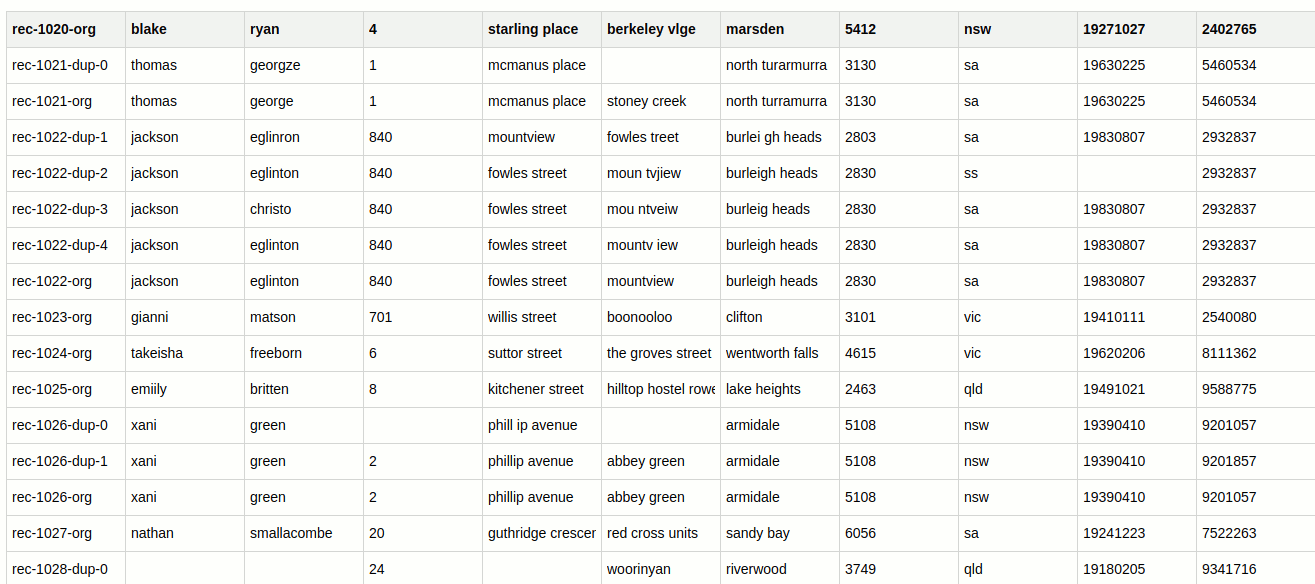
Zingg solves this by clustering records that represent the same real-world entity before the data reaches the LLM. Each cluster receives a `Z_CLUSTER ID`. The LLM retrieves unified, consistent\
information instead of fragmented duplicates. This approach is called Identity RAG.
### Why identity resolution matters for RAG
Without entity resolution, slight variations in names like "John Doe" vs "Jon Do"; or duplicate records from different source systems cause the retrieval layer to return inconsistent results. The LLM receives fragmented context and provides wrong or incomplete answers.
Zingg clusters all records representing the same entity before they reach the vector store. The retriever finds all of them together. The LLM gives a complete, entity-aware answer.
### How it works
{% stepper %}
{% step %}
### Step 1: Run Zingg match
Run the Zingg match phase on your dataset. Zingg clusters duplicate records and assigns each cluster a `Z_CLUSTER` in the output CSV.
{% endstep %}
{% step %}
### Step 2: Import and preprocess
Read the Zingg output CSV. Convert each record into a combined text string and store `Z_CLUSTER` as metadata.
{% endstep %}
{% step %}
### Step 3: Embed and store
Use an embedding model to create vector representations of each text string. Store them in a vector database with cluster metadata attached.
{% endstep %}
{% step %}
### Step 4: Build the retrieval chain
Create a `LangChain` retrieval chain that uses the vector store as the retriever and an LLM to generate structured responses.
{% endstep %}
{% step %}
### Step 5: Query
Invoke the chain with a natural language query. The LLM retrieves top matching records from the vector store and generates a response that respects entity cluster boundaries.
{% endstep %}
{% endstepper %}
### Import and preprocess Zingg output
```python
import pandas as pd
df = pd.read_csv("zingg-out.csv")
def preprocess(row):
text = (
f"First Name: {row['FNAME']}, "
f"Last Name: {row['LNAME']}, "
f"Date of Birth: {row['DOB']}, "
f"Address: {row['STNO']} "
f"{row['ADD1']}, {row['ADD2']}, "
f"{row['AREA_CODE']} "
f"{row['STATE']}"
)
metadata = {
"cluster": row["Z_CLUSTER"],
"ssn": row["SSN"],
"state": row["STATE"],
"dob": row["DOB"]
}
return {"text": text, "metadata": metadata}
documents = [preprocess(row) for _, row in df.iterrows()]
texts = [doc["text"] for doc in documents]
metadatas = [doc["metadata"] for doc in documents]
```
{% hint style="success" icon="right-long" %}
`zingg-out.csv` is your Zingg match output. `Z_CLUSTER` is the resolved entity identifier added\
by Zingg during the match phase. Update the field names (FNAME, LNAME etc.) to match your own schema.
**Read more**: For running the match phase - [Run the Match Phase](/docs/running-zingg/run-the-match-phase.md).
{% endhint %}
Preprocess data with entity clustering
### Create embeddings and vector store
{% hint style="success" icon="right-long" %}
This example uses Ollama with `nomic-embed-text` and Chroma as the vector store. Replace with your own embedding model and vector database as needed.
{% endhint %}
```python
from langchain_ollama import OllamaEmbeddings
from langchain_chroma import Chroma
embeddings = OllamaEmbeddings(model="nomic-embed-text")
vector_store = Chroma.from_texts(
texts=texts,
embedding=embeddings,
metadatas=metadatas,
persist_directory="./chroma_db"
)
retriever = vector_store.as_retriever(search_kwargs={"k": 2})
```
### Build the LangChain chain
The LangChain chain combines the retriever, an Ollama LLM, a prompt template, and an output parser. The prompt template tells the LLM how to behave. Those instructions are shown below as prose; then the chain itself is shown as Python.
#### **Prompt instructions (paste into your template)**
You are an identity resolution expert. Analyse the cluster information to:
1. Match records based on name, DOB, and other attributes
2. Handle typos and name variations (for example, "Schulz" vs "Schultz")
3. Compare DOBs in YYYY-MM-DD format
4. If no exact match, show closest candidates with differences
5. Always mention Cluster ID and record count
Format the response as:
* Query
* Closest Match
* Cluster ID | Record Count | Match Confidence
* Details (differences between records)
#### **Chain construction**
```python
from langchain_core.prompts import ChatPromptTemplate
from langchain_ollama import ChatOllama
from langchain_core.runnables import RunnablePassthrough
from langchain_core.output_parsers import StrOutputParser
template = ""
prompt = ChatPromptTemplate.from_template(template)
llm = ChatOllama(model="llama3:8b")
chain = (
{"context": retriever, "question": RunnablePassthrough()}
| prompt
| llm
| StrOutputParser()
)
```
### Query the chain
#### **Query 1: exact name and DOB match**
The query searches for records related to "benjamin koerbin" born on "19210210" using the identity-aware retrieval system.
```python
response = chain.invoke(
"Find records of benjamin koerbin "
"born on 19210210"
)
print(response)
```
The system successfully retrieves two matching records from the same cluster (Cluster ID 21) with 100% match confidence, confirming both documents correspond to the queried entity without discrepancies. The response shows the query, the closest match, the Cluster ID, record count, match confidence, and that exact matches were found on both name and date of birth.
{% hint style="success" icon="right-long" %}
In Query 2 the system identifies the correct cluster even though "`eling`" is a typo for "`eglinton`". Zingg grouped both spellings into the same cluster before the data reached the vector store, so the retriever found all matching records regardless of the variation.
{% endhint %}
#### **Query 2: typo tolerance with fuzzy matching**
The query searches for records of "jakson eling," which contains a potential typo in the last name.
```json
response = chain.invoke("Find records of jakson eling")
print(response)
```
The system identifies and retrieves three matching records under the same cluster, despite the typo in the query. It correctly maps `eling` to `eglinton` using fuzzy matching, ensuring accurate identity resolution.
{% hint style="success" icon="right-long" %}
Zingg grouped both spellings (`eglinton` and `eling`) into the same cluster during the match phase - before the data reached the vector store. The retriever finds all matching records regardless of input variation.
{% endhint %}
### Use cases
Customer service chatbots
Resolve customer identities across fragmented databases so the chatbot retrieves complete, unified records regardless of how the customer name was entered across different channels.
Healthcare systems
Link patient records from multiple providers under a single cluster. The LLM retrieves complete patient context rather than fragmented records from different systems.
Financial compliance
Detect duplicate transactions or accounts for fraud prevention. Zingg clusters related records, and the LLM reasons over a unified entity context.
E-commerce
Unify customer profiles from different channels for personalized recommendations. The LLM retrieves the complete customer entity rather than individual fragmented records.
{% hint style="success" icon="right-long" %}
**Read more:**
* For the full Zingg workflow - [How Zingg works](/docs/running-zingg/step-by-step-guide.md)
* Download the notebook from the Zingg GitHub repository: `github.com/zinggAI/zingg`
{% endhint %}
---
# Agent Instructions
This documentation is published with GitBook. GitBook is the documentation platform designed so that both humans and AI agents can read, navigate, and reason over technical content effectively. Learn more at gitbook.com.
## Querying This Documentation
If you need additional information that is not directly available in this page, you can query the documentation by asking a question.
Perform an HTTP GET request on the following URL with the `ask` and `goal` query parameters:
```
GET https://zingg.ai/docs/recipes-and-integration/identity-rag-with-zingg-and-langchain.md?ask=&goal=
```
`ask` is the immediate question: it should be specific, self-contained, and written in natural language.
`goal` is what the user is ultimately trying to achieve, the reason they need the answer. Sharing it helps GitBook give you a better, more relevant answer. A goal is most helpful when it describes the outcome the user wants rather than restating the question. For example, with `ask=how do I create an API token`, a goal like `automate deployments from our CI pipeline` lets GitBook tailor the answer to that use case.
The response will contain a direct answer to the question and relevant excerpts and sources from the documentation.
Use this mechanism when the answer is not explicitly present in the current page, you need clarification or additional context, or you want to retrieve related documentation sections.