Most data about people, companies, or products is scattered across systems and never quite agrees with itself. Zingg resolves it into one accurate record, running natively on your own data, with no data leaving your Databricks environment.
We are launching the Zingg Databricks app - an end to end pipeline for entity resolution. This app deploys Zingg Community on Databricks within your chosen workspace. All data and config - input and resolved output, Zingg configuration and models say in the user workspace. The app installs Zingg and brings the Zingg Python notebooks which can be customised by the end user.
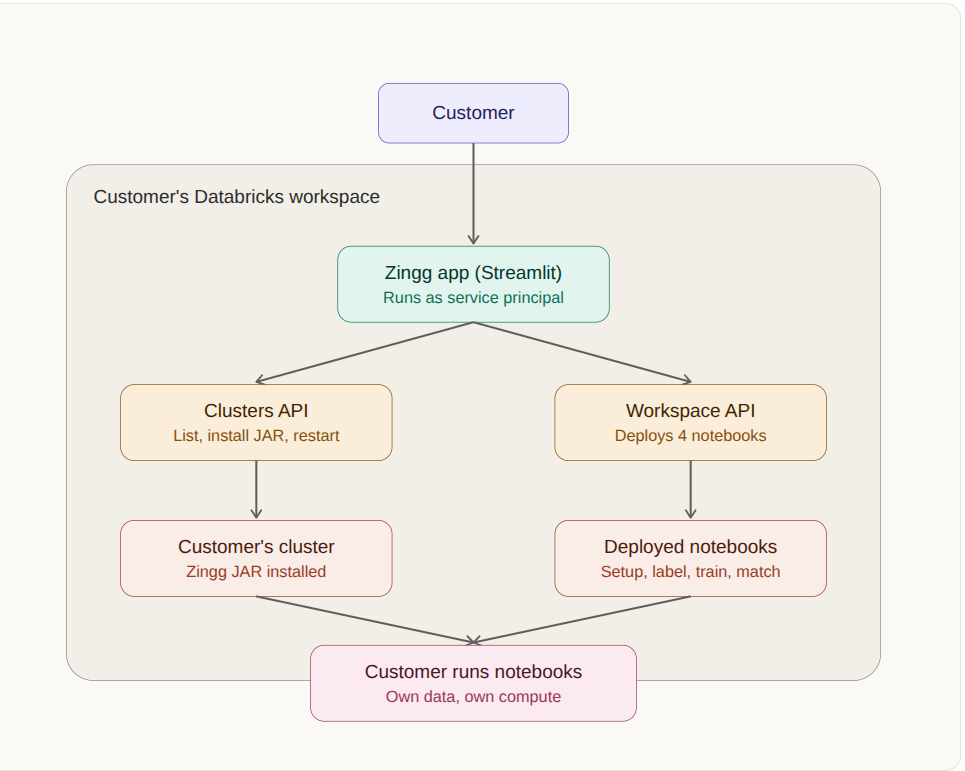
The app authenticates as its own Databricks service principal for every action it performs: listing clusters, checking or installing the Zingg JAR, starting or restarting the selected cluster, and writing the bundled notebooks into your Workspace folder.
The app comes with 4 Zingg notebooks. The notebooks are modularised to perform the following activities whent he user run them.
Each notebook refers to the first notebook so that the configuration can be reused. All four notebooks are deployed together into the same folder. You can edit the input and output table names, field definitions, and match types in notebook 1. Each notebook contains detailed instructions. You run all four notebooks directly, in order, on your selected cluster, entirely outside this app once they are deployed.
The diagram below shows how the app interacts with your Databricks workspace. The app runs entirely inside your own workspace, on your own cluster compute. It only performs setup actions, listing clusters, installing the bundled Zingg JAR, starting or restarting the selected cluster, and copying the app's own bundled notebook files into your Workspace. All actual entity resolution work, including labeling, training, matching, and storing results, happens later when you run the deployed notebooks yourself, entirely on your own compute and against your own data. The app does not transmit any business data or match results externally at any point.
app.yaml, requirements.txt, and application source.
Documentation: docs.zingg.ai
Community: Zingg Slack
For Zingg Enterprise, including persistent Zingg IDs and incremental matching for live entity graphs, contact us.


.png)

